Buy a coffee, type 12, tap Coffee, and kitty shows you what’s left in that part of the budget. It only takes a few seconds, so it’s easy to keep up with.
Bills, the kids’ costs, savings goals and super all go in the same kitty, and each adult in the house has their own sign-in.
Quick-add is the screen kitty is built around. If writing down a coffee feels like a chore, nobody does it, and the budget turns into guesswork.
1
Type the amount
It’s the only thing on the screen, so there’s nothing to look for.
2
Tap a category
The categories you use most sit at the top, and the tap saves it. There’s no Save button to find.
3
See where that leaves you
A small receipt shows how that budget is going, say $62 of $120 spent with $58 left. If you’ve gone over, it tells you plainly.
Notes, receipt photos and who the money was for can wait. You can add them from the receipt, or come back to the entry later.
See it on a phone
This is the app itself, recorded on a phone with a made-up household. A coffee goes in, the dashboard and budget show where that leaves things, $100 goes into the emergency fund, and a bank statement comes in with the coffee already recognised.
The video has no sound, and the figures are made up.
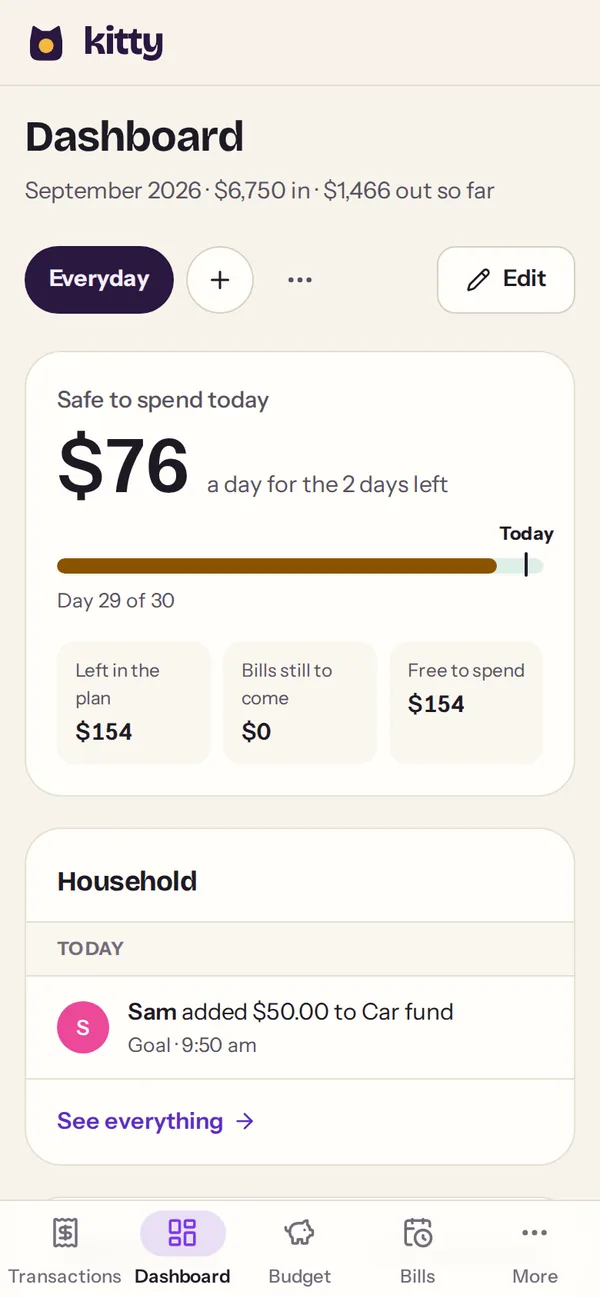
Dashboard $76 a day is safe to spend for the two days left, and Sam put $50 in the car fund this morning.
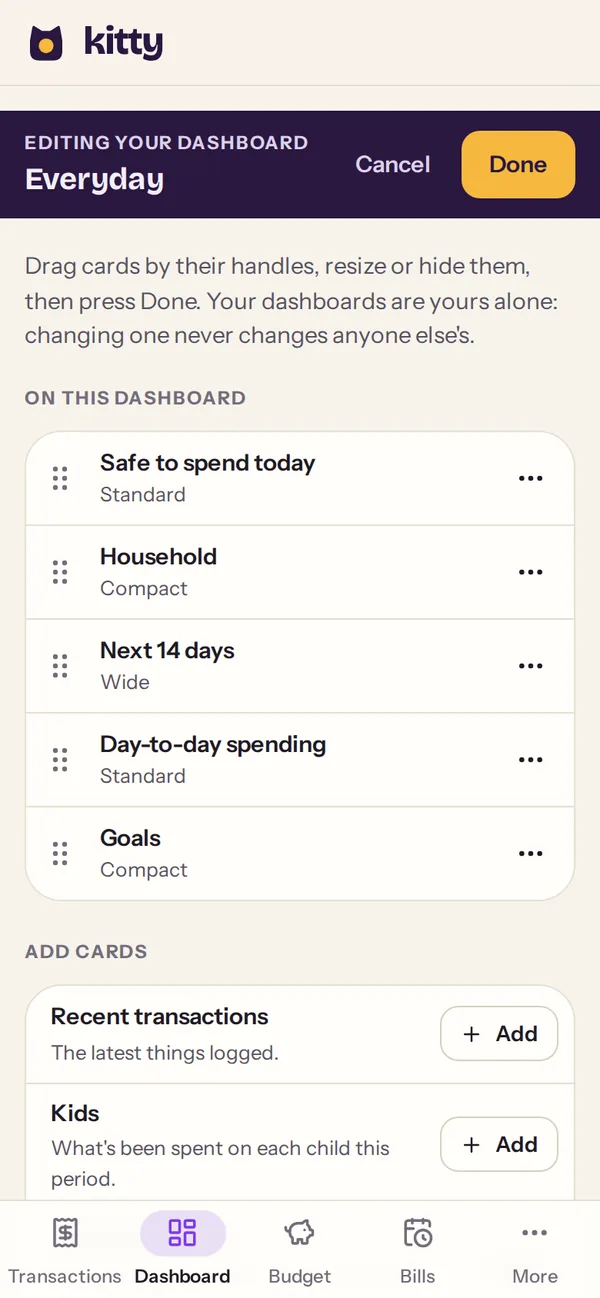
Your own dashboard Drag the cards into order, pick their sizes and add the ones you want. Changing yours never changes anyone else’s.
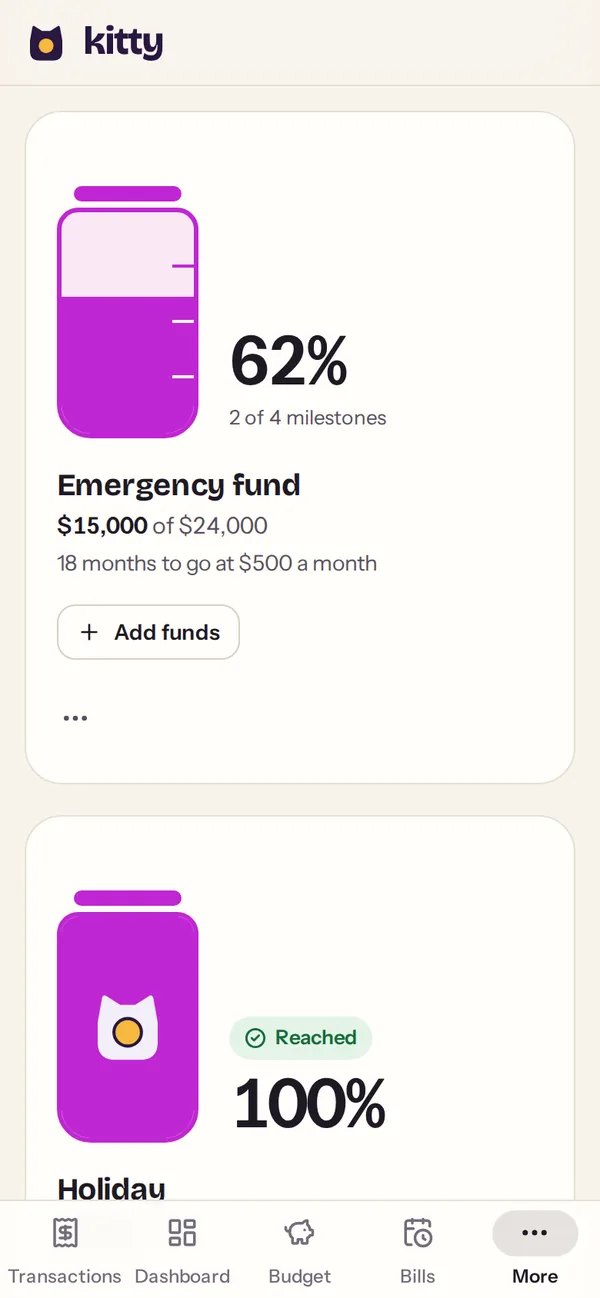
Goals The emergency fund is 62% of the way. The holiday jar is full, so the kitty has climbed in.
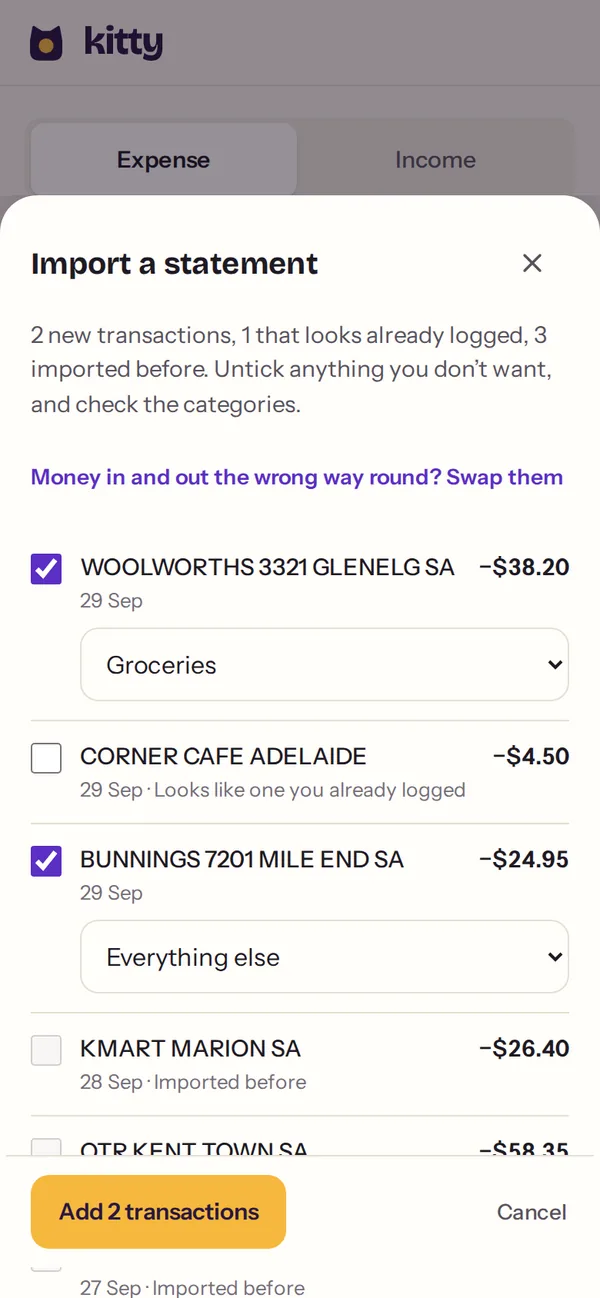
Statement import Two rows are new. The coffee was already logged by hand and three rows came in last time, so kitty leaves those out.
What else kitty looks after
kitty started as our family’s budget spreadsheet in Adelaide, with two adults, three kids and a long list of bills. Everything in it is here because we used it.
Bills and the next 14 days
Saw the car rego due next Tuesday and moved the money across on Monday
The rego is yearly, the power bill is quarterly and swimming is fortnightly, so sooner or later two of them land in the same week. kitty lays out the next two weeks and tells you in words when something’s overdue.
Electricity$412.60Every 3 monthsOverdue · 3 days
Car registration$881.00YearlyDue today
Swimming lessons$96.00FortnightlyIn 6 days
Home internet$89.00MonthlyPaid
Budget
Checked groceries on Thursday, and there was enough left for the weekend
With a spreadsheet, you usually find out the grocery money ran out after it has. kitty shows how each category is going against how far through the month you are, and says plainly when one is running over.
Groceries$624.00 of $900.00
Eating outOver by $40.00
Safe to spend today
Opened kitty on Friday night, saw $46 safe to spend, and ordered the pizza
A few days before payday it’s hard to know whether takeaway fits, because you’d have to add up everything still to come out. kitty does that sum for you, bills included, and shows one number for today.
Receipt photos
Snapped the receipt at the counter, and now it’s home safe in the kitty
Paper receipts fade, and the one you need for a return or a tax claim is never in your wallet. Take a photo as you log the spend and it stays with the entry.
Shared as it happens
Your partner paid for the school photos, and it was on your phone a moment later
When two of you spend from the same budget, it’s easy to both buy the milk, or for each of you to think the other paid the school fees. You each sign in with your own email, and what one of you logs shows up on the other’s phone straight away. The dashboard even shows who’s been at the kitty today.
Kids
Paid for swimming, put it against the youngest, and moved on
Between childcare, school fees and the odd excursion, it’s hard to say what each child actually costs. kitty gives each one a card with what they cost a month, childcare after the Child Care Subsidy included, and their one-off costs for the year alongside.
Add a cost from a child’s card, or mark who a spend was for when you open it later. If there are no kids in the house, you won’t see any of this.
Y
Youngest$960.27 a month
Childcare after 72% CCS$173.60/wk
Regular costs$208.00/mo
One-offs, past year$85.00
E
Eldest$483.33 a month
Regular costs$483.33/mo
One-offs, past year$240.00
Your own dashboard
Moved the bills to the top of my dashboard, and yours stayed the way you like it
One of you checks what’s due before payday, and the other goes straight to the savings jars. Each adult arranges their own dashboard: which cards, in what order and at what size, with a few kept as tabs, like one for every day and one for month end. Changing yours never changes anyone else’s.
Month endEveryday
Bills dueStandard
Safe to spend todayCompact
Spend by categoryWide
Goals
Put $100 in the holiday jar and watched the coin drop in
You’re putting money away for a holiday and want to know you’ll have enough by the time you go. Each goal is a jar that fills as you add to it, and shows how many months are left at the amount you plan to put in.
Fill a jar and the kitty climbs in. That’s a good kitty.
Debts
Added an extra $50 a month to the card and watched the debt-free date come closer
Paying the minimum on a credit card, it’s hard to tell when it’ll ever be gone, or what paying a little more would change. kitty shows how many months until you’re debt-free, and how many fewer it takes if you pay a little extra. It puts the highest interest first, because that order costs you least.
Net worth
Glanced at net worth at the end of the year, and the line had climbed
It’s hard to tell whether you’re getting ahead when the savings, the super, the house and the mortgage all sit in different places. kitty adds them up and records the total every night, so you can see which way it’s heading.
Monthly report
Printed last month’s report and stuck it on the fridge
The monthly money talk goes better when you both have the numbers in front of you. kitty puts the month into a report you can print or save.
Offline
Logged the servo stop with no signal, and it went through once we were back in range
Country servos and underground car parks rarely have good signal. kitty keeps the entry on your phone and sends it once you’re back in range.
On the way
One more thing we’re building now
Your monthly report will come as a PDF each month, ready to print or send on. We haven’t promised a date. It’ll turn up in the app when it’s ready.
Also in the box
Anything deleted can be restored
Pay days on the calendar
Import a bank statement
Dark mode
Installs to your home screen
Long term
Retirement, worked out from the numbers you already keep
If retirement is in sight, kitty projects your super from the day work stops and draws it down over the years, counting the Age Pension from pension age. It starts from what you’ve already entered for the budget, so there’s very little extra to set up.
The Age Pension, counted
It’s worked out fortnightly at the rates in force and added in from pension age.
What-ifs that leave the plan alone
Try retiring earlier or spending less, and your real plan stays exactly as it was.
Every figure shows its working
Open “How this was worked out” under any figure to see each step and the rates it used. The monthly report lists every rule it applied, and which version.
Easy to read
The retirement pages use larger text and bigger buttons throughout.
This is general information, not financial advice. The projections depend on the figures you enter and the rules in force, and they aren’t a guarantee of what will happen.
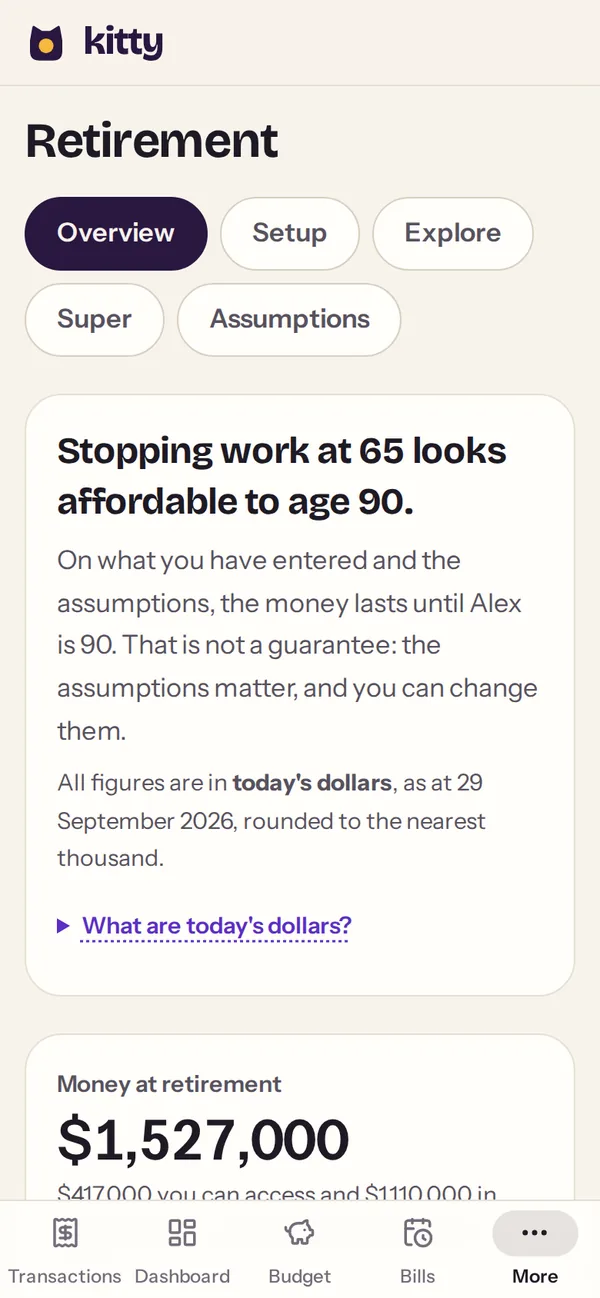
The answer, in a sentence Stopping work at 65 looks affordable to 90, with the money at retirement underneath.
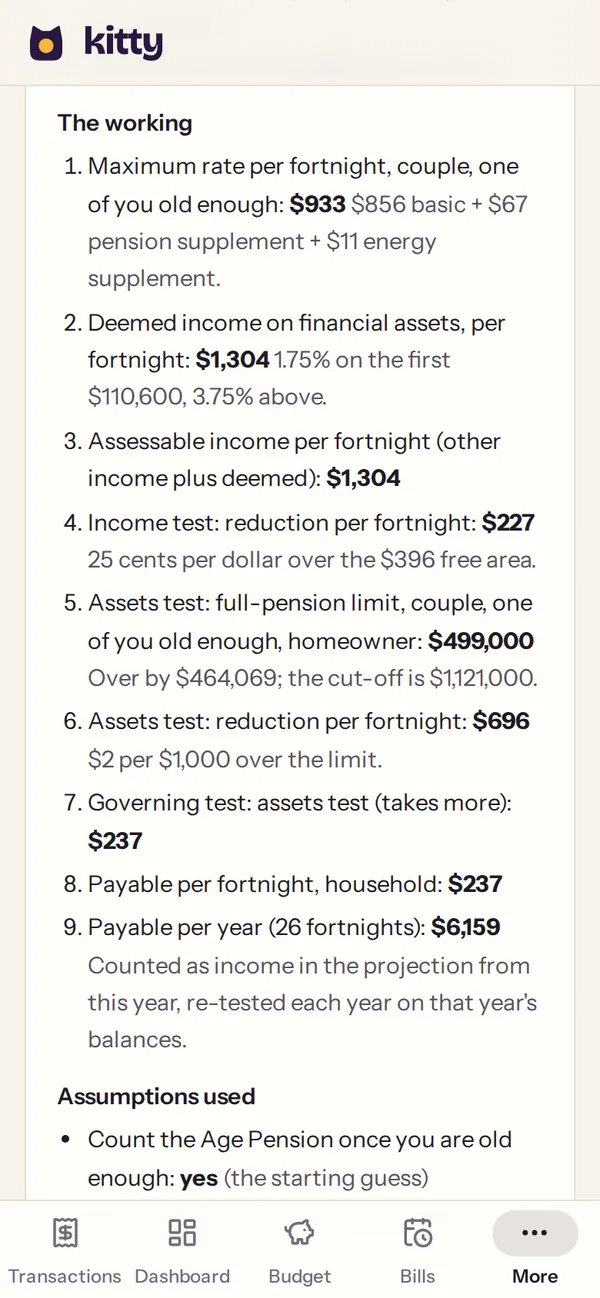
The working The Age Pension is worked out in nine steps, from the maximum rate to the assets test that sets it.
These are screens from kitty, with a made-up couple.
What goes in the kitty stays in the kitty
It’s your household’s money, so kitty is built to keep it between the people in your house.
It never asks for your bank login
Most budgeting apps ask you to link your bank before you’ve seen anything. kitty doesn’t, because you log spending as it happens and set bills and income up once.
Only your household can see it
Each adult signs in with their own email, and every household is kept apart from every other.
Mistakes can be undone
Every change is kept along with what it replaced, so anything deleted by mistake can be restored from History.
Backed up every night
A full copy is made every night, and the last 30 nights and 12 months are kept.
Nothing to sell you
kitty is paid for by the households that use it, so there are no ads, and no loans or cards to steer you towards.
Stripe handles the card
Payments go through Stripe, and kitty never sees or stores your card number.
“Our budget never fell apart on the maths. It fell apart because nobody wrote the coffee down, so we made that the easiest part.”
[Your name], Adelaide
One kitty for the whole household
Everyone in the house gets every feature, on whatever device they use. It’s free for 30 days, and nothing is charged today.
kitty for your household
A$80/ year
A$6.67 a month, billed yearly.
A$8/ month
Billed monthly. You can switch to yearly at any time.
Free for 30 days, then A$80 a year. We’ll email you a week before the trial ends.
Free for 30 days, then A$8 a month. We’ll email you a week before the trial ends.
A sign-in for each adult
Phone, tablet and laptop
Every feature, retirement included
Nightly backups and a full history
Pension, tax and super rules kept up to date
Prices are in Australian dollars. Payments are handled by Stripe, and you can cancel from Settings at any time.
How checkout works
1Choose yearly or monthly and add your email, and your partner’s too if you like.
2Pay securely with Stripe. Nothing is charged for the first 30 days.
3Sign in with a one-time code and log your first coffee.
Questions people ask
If yours isn’t here, email [support address] and one of us will reply.
Do I have to connect my bank?
No. kitty never asks for your bank login. You log spending as it happens, which takes a few seconds, and set your bills and income up once. If you’d rather catch up in one go, download a statement from your internet banking and import it. kitty reads the file on your device.
Can my partner use it too?
Yes. Each adult signs in with their own email and works in the same kitty. Kids don’t need accounts; a cost can simply be marked as being for one of them.
Does it work on my phone and my laptop?
It works on both. kitty runs in the browser, and on iPhone and Android you can add it to your home screen like an app. If you lose signal, entries wait and send themselves once you’re back online.
Is the retirement section financial advice?
No. It’s general information, projected from the figures you enter and the published Australian rules. For advice about your own situation, talk to a licensed financial adviser.
How does the free trial work?
You pay nothing for the first 30 days. Your card is saved with Stripe at checkout and first charged on day 31. We’ll email you a week before that, and you can cancel from Settings at any time.
What happens if I cancel?
You keep full access until the time you’ve paid for runs out. After that kitty goes read-only for 90 days, so you can still look back, export your data or pick up where you left off. Then the household’s data is deleted for good, and backup copies age out within 12 months. If you’d like it gone sooner, you can delete it yourself from Settings.
Put your first coffee in the kitty
See how it feels to log a spend in three taps. If kitty isn’t right for your household, cancel before day 30 and you won’t pay anything.